

Does an eSIM adapter work if your phone is carrier-locked?
An eSIM adapter does not bypass a phone’s carrier lock. It can work only when the handset accepts the selected profile under its existing lock restrictions, or after the carrier unlocks it; loading a profile successfully does not prove that the phone will connect to that profile’s network.
- An esim adapter carrier locked phone setup does not bypass network restrictions; confirm unlock status before choosing hardware.
- Switchesim eSIM adapters suit compatible physical-SIM devices, not buyers seeking a carrier-lock workaround.
- Switch Pro uses Android-based management; a configured Switch Max supports compatible iPhone use.
- The Bluetooth reader loads profiles without an Android phone, but does not unlock the receiving handset.
Does an eSIM adapter work if your phone is carrier-locked?
Not as a way to use an otherwise prohibited carrier. An adapter changes how you store and present an eSIM profile through a physical SIM slot. It does not change the handset’s carrier authorization.
Keep adapter compatibility separate from network permission. The guide to adding eSIM to a phone without native support covers the hardware question; carrier locking remains a separate check.
| Handset situation | What the adapter changes | What you must establish |
|---|---|---|
| Locked phone with another carrier’s profile | Makes the profile available through the adapter | Whether the handset permits that carrier; the adapter provides no bypass |
| Locked phone with a profile accepted by its lock policy | Provides an alternative profile-storage format | Whether the carrier, profile and adapter combination is supported |
| Unlocked phone with a compatible physical SIM slot | Adds an adapter-based eSIM path | Model, operating system, provider and network compatibility |
| Phone without a physical SIM slot | Cannot provide a place to insert the adapter | Use a supported native eSIM route instead |
A profile from the carrier that sold the phone is not automatically an approved adapter configuration. Ask about the exact service and handset rather than assuming that a matching carrier name settles compatibility.
Why this matters
A successful profile download and a working mobile connection are different results. You can complete provisioning yet still face a handset restriction when the phone attempts to use the selected subscription.
For a 2026 purchase, settle the carrier-lock question before comparing adapter features. Otherwise, you risk choosing hardware that solves a missing native eSIM function while leaving the actual obstacle untouched.
Switchesim eSIM adapters are best for buyers with compatible physical-SIM devices who need profile flexibility, not a carrier-lock bypass. That distinction applies to Android phones, compatible iPhones and other supported devices.
Check device fit before choosing an adapter
A physical SIM tray is necessary, but it is not a complete compatibility result. Check the exact model and regional variant, not just the name printed on the phone’s box.
Work through these requirements before ordering:
- Physical SIM slot: Confirm that your particular handset has a usable slot for the adapter.
- Carrier-lock status: Establish whether the intended subscription is permitted, or complete the carrier’s unlocking process.
- Model and regional variant: Match the adapter’s compatibility guidance to the device you own.
- Operating system: Confirm the supported system and the required profile-management route.
- Network bands: Check that the handset supports the intended service where you will use it.
- Provider support: Confirm that your chosen eSIM provider supports the intended activation method and device arrangement.
An unlocked handset can still fail another item on this list. Unlocking removes a carrier restriction; it does not add missing radio bands, a physical SIM tray or support for an incompatible management application.
On iPhone, inspect Settings, General, About, then Carrier Lock. Apple uses the wording “No SIM restrictions” to indicate an unlocked iPhone; if you cannot establish the status, ask the carrier before buying another subscription.
Android menus vary by manufacturer and carrier. Get the lock status confirmed for the specific handset rather than treating a missing menu entry as evidence that it is unlocked.
Choose the profile-loading path separately from network access
Switchesim distinguishes Android-based management, compatible iPhone use and reader-based provisioning. These are setup choices, not different ways around a lock.
The following table separates the relevant hardware roles. Choose only after confirming that the receiving device can use the intended carrier profile.
| Hardware | Best for | Setup role | Limitation to resolve first |
|---|---|---|---|
| Switch Pro | Buyers using compatible Android-based profile management | Uses the Switch Android app to manage profiles | Confirm Android compatibility and the target device’s carrier permissions |
| Switch Max | Buyers planning compatible iPhone use with a configured card | Extends adapter use to compatible iPhones | The iPhone needs a compatible physical SIM slot; configuration does not remove its lock |
| Bluetooth reader | Buyers loading profiles without an Android phone | Provides reader-based provisioning | Loading a card does not authorize it on a locked handset |
Switch Pro: Android-based profile management
Switch Pro is the relevant choice when you want to manage profiles through the Switch Android app on a compatible device. Its benefit is the Android-based management path; its constraint is that you must verify that path against your actual handset and operating system.
Do not interpret app access as network approval. Seeing a profile in a management interface does not mean the receiving phone accepts that subscription under its carrier-lock policy.
Choose Switch Pro for verified Android management compatibility, not to unlock a phone.
Switch Max: configured-card use in compatible iPhones
Switch Max is the relevant choice when your plan includes using a configured card in a compatible iPhone. Start with the tray: an iPhone without a physical SIM slot cannot accept a physical eSIM adapter.
Keep configuration and everyday use separate. Support for a configured card in an iPhone is not a claim that every profile-management action happens through the iPhone’s native eSIM settings.
Choose Switch Max after confirming the iPhone variant, configuration path and carrier status.
Bluetooth reader: provisioning without an Android phone
The Bluetooth reader provides a profile-loading route without an Android phone. Switchesim describes its reader as open source and states that no app or account is required.
That addresses provisioning access, not carrier permission. A card prepared outside the handset still has to pass the receiving device’s compatibility and network checks.
Choose the Bluetooth reader when its provisioning route fits your setup, not as an unlocking accessory.
How should you check a locked phone before setup?
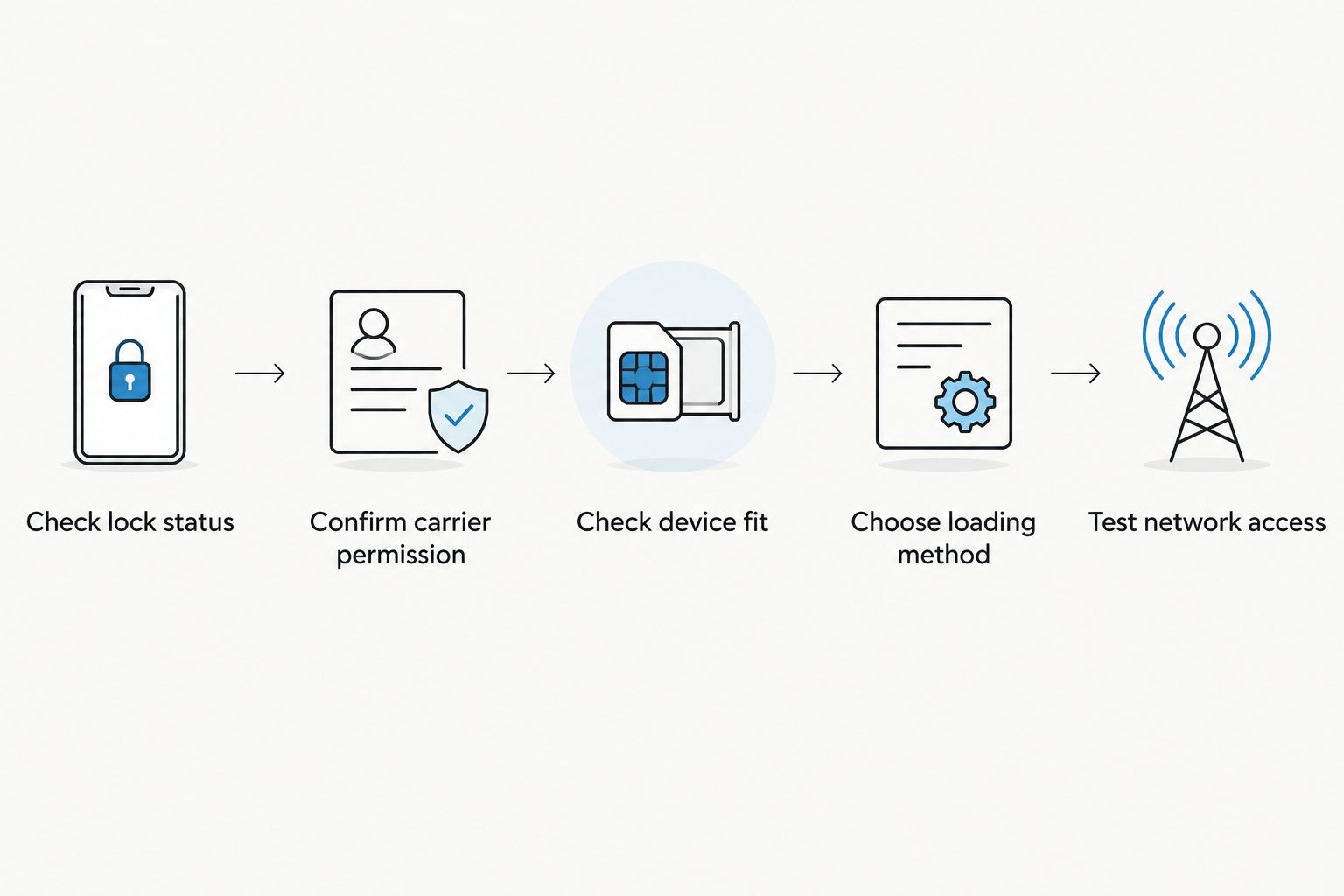
Use this sequence for a 2026 setup. Start with authorization, then move to hardware and profile loading; troubleshooting in the opposite order obscures the cause of failure.
- Check lock status. Confirm the handset’s status through its supported settings or the carrier. Record the exact device model and regional variant.
- Confirm carrier permission. Ask whether the intended subscription is permitted. If not, follow the carrier’s official unlocking process before relying on the adapter.
- Check device fit. Verify the physical SIM slot, operating system, adapter compatibility and network bands.
- Choose loading method. Select Android app management, configured Max use or reader-based provisioning as appropriate.
- Test network access. Follow the provider’s activation instructions, select the intended profile and verify mobile service on the target handset.
Keep provisioning and connection checks separate throughout setup. This sequence prevents a downloaded profile from being mistaken for a completed network test.
Test with Wi-Fi disabled when checking whether cellular data works. A web page loading over Wi-Fi does not establish that the selected mobile profile has connected.
Why adapter results vary between phones
The adapter is only part of the connection path. For a 2026 compatibility check, these factors explain why the same purchasing decision cannot be applied to every handset:
- Carrier policy: The handset’s restriction determines which subscriptions it accepts until it is officially unlocked.
- Physical hardware: The target needs a compatible physical SIM slot; the adapter does not create one.
- Regional variant: Devices sharing a product name can have different SIM arrangements and radio support.
- Operating system and management route: Android app management, configured iPhone use and reader provisioning have different requirements.
- Provider activation rules: Follow the chosen provider’s supported activation method rather than assuming every profile works identically.
- Network compatibility: Supported bands and service coverage still matter after successful provisioning.
A failure at one stage does not identify the others. For example, a profile-loading error is not proof of a carrier lock, and a network rejection is not proof that the adapter itself is defective.
Do profile capacity, privacy or pre-loaded data change the answer?
None of these features removes a carrier lock. They matter after you establish that the target device can use the intended subscription.
For profile capacity, check the exact adapter’s supported storage and management behavior before buying. Stored profiles and simultaneously active connections are different capabilities; do not treat a larger profile library as a promise of more active mobile lines.
For privacy, separate the hardware’s provisioning model from the mobile provider’s service. A reader’s no-account claim does not mean the mobile subscription has no identity, activation or account requirements, and open-source status alone does not establish a complete security assessment.
Pre-loaded destination-data cards change the preparation step, not the handset restriction. The supplied catalog includes China mainland, Japan and South Korea options with 10GB for 30 days and 20GB for 30 days, plus a China mainland, Hong Kong and Macao option with 50GB for 180 days. Those allowances and validity periods describe plans, not unlock capabilities or guarantees of device compatibility.
Bulk or white-label supply is also separate from network authorization. If you are preparing devices for others, verify the target models and carrier status before choosing the provisioning workflow or ordering a batch.
Will a travel eSIM work if it roams on my locked carrier’s network?
Do not assume that it will. A travel provider using a local network for roaming is not the same thing as your handset accepting that provider’s subscription.
Ask the carrier about the intended profile rather than relying on the destination network’s name. For a 2026 trip, resolve this before you depend on the adapter for arrival-day connectivity.
Does loading the card in another device remove the lock?
No. Another compatible phone or a Bluetooth reader changes where provisioning happens, not the receiving handset’s carrier authorization.
Once you insert the configured card, the target phone still applies its own restrictions. Off-device preparation solves a management-access problem, not a locked-handset problem.
Is an adapter still useful after the carrier unlocks my phone?
Yes, if the remaining compatibility checks pass. An adapter can provide an eSIM route for a supported device that lacks native eSIM support.
Official unlocking does not select the right hardware for you. Confirm the physical slot, operating system, profile-loading route, provider and network support before choosing an adapter.
FAQ
Can I use an eSIM adapter to unlock my carrier-locked phone?
No. An eSIM adapter does not remove a carrier lock; use the carrier’s official unlocking process before relying on a profile the handset currently prohibits.
Will my own carrier’s eSIM work through an adapter on a locked phone?
It is not guaranteed. Confirm that the carrier supports the exact profile, handset and adapter arrangement rather than assuming a matching carrier name is enough.
Does Switch Max bypass an iPhone carrier lock?
No. Switch Max supports configured-card use in compatible iPhones, but the iPhone still needs a compatible physical SIM slot and permission to use the intended subscription.
Can a Bluetooth reader prepare a card for a locked phone?
A Bluetooth reader provides a profile-provisioning route, not a carrier unlock. Successful preparation does not establish that the receiving handset will accept the profile.
Does an unlocked phone automatically support an eSIM adapter?
No. You must also check the physical SIM slot, exact model, regional variant, operating system, management route, provider and network compatibility.
Will a pre-loaded travel-data card get around my phone’s lock?
No. Pre-loading changes when the profile is prepared; it does not change the receiving handset’s carrier restrictions.
What should I check before buying an eSIM adapter in 2026?
Check carrier permission and the physical SIM slot first. Then confirm the exact device variant, supported management method, profile capacity, provider activation requirements and network bands.
One last thing
Keep your existing working SIM until the replacement setup passes a cellular test. A saved profile, a successful download message and a working Wi-Fi connection are not substitutes for mobile service on the target device.
The practical 2026 buying decision is simple: resolve the lock first, confirm device fit second, then choose how you will manage profiles. Adapter hardware belongs after those checks, not before them.



