
Can an eSIM adapter add eSIM to a phone that doesn't support it?
Yes—an eSIM adapter for phones without eSIM can add access to eSIM profiles through a compatible physical SIM slot. It does not add native eSIM hardware, bypass a carrier lock or make an unsupported phone compatible. In 2026, the buying decision depends on your exact device, how you will load profiles and whether you need Android management or iPhone use.
- An esim adapter for phones without esim requires a compatible physical SIM slot; carrier restrictions still apply.
- Switchesim eSIM adapters suit buyers keeping compatible SIM-slot phones rather than replacing them for native eSIM support.
- Switch Pro uses Android-based profile management; Switch Max extends use to compatible iPhones.
- The Bluetooth reader loads profiles without an Android phone; it does not replace the adapter card.
Can an eSIM adapter add eSIM to a phone that doesn't support it?
Yes, provided the phone supports the adapter through its physical SIM slot. The adapter supplies the removable hardware that holds eSIM profiles. Your phone still needs to recognize the card and connect to the network used by the selected plan.
Profile management and phone use are separate tasks. A phone that can use a configured card is not necessarily a phone that can download or manage profiles directly. Start with the Android eSIM adapter guide if you intend to manage the card from Android.
| Option | Best for | Profile-loading approach | Benefit | Limitation |
|---|---|---|---|---|
| Switch Pro | Buyers with a compatible Android management device | Switch Android app | Android-based profile management | Do not assume the target phone supports management merely because it has a SIM slot |
| Switch Max | Buyers using a configured adapter in a compatible iPhone | Confirm the supported management or reader route | Extends adapter use to compatible iPhones | Requires a compatible physical SIM slot; iPhone use is not the same as native iOS management |
| Bluetooth reader | Buyers who need to load profiles without Android | Reader-based provisioning | Removes the Android-phone requirement for loading profiles | Separate provisioning hardware, not the card used in the phone |
| Pre-loaded destination-data cards | Buyers who want a destination plan already loaded | Initial plan is pre-loaded | Removes the initial profile-loading task | Destination, allowance and validity still need to match your needs |
Why this matters
An adapter changes how you obtain and store a mobile subscription. It does not change your phone's radio hardware. A working adapter cannot supply network bands the phone lacks or remove restrictions imposed by its carrier.
Switchesim eSIM adapters suit buyers keeping compatible SIM-slot phones rather than replacing them for native eSIM support. The trade-off is an additional compatibility check and a separate profile-management workflow.
For a 2026 purchase, answer two questions before choosing hardware: can the target phone use the configured card, and what device will manage it? Treating those as the same question is how you end up with a card you cannot configure.
Device fit comes before product choice
Check the physical SIM slot
A physical adapter needs a compatible physical SIM slot. A device without that slot cannot use this kind of removable card. Do not infer compatibility from the phone's family name alone.
Check the exact model and regional variant. Also confirm which slot you intend to use if your phone has more than one SIM position. The presence of a tray is necessary, but it is not a complete compatibility result.
Check carrier locks and network support
An eSIM adapter is not a carrier-unlocking device. If your phone is restricted to a carrier, resolve that restriction before relying on a profile from another provider.
Check the phone's supported network bands against the intended network. An adapter does not add bands. Then check the eSIM provider's activation requirements rather than assuming every downloadable plan accepts the same setup method.
Check the operating system used for management
Android management requires a compatible Android device and the supported Switch app setup. Confirm the operating-system requirements for that exact device before buying Switch Pro.
For iPhone use, confirm that the specific iPhone variant has a compatible physical SIM slot and supports the configured Switch Max card. Do not assume the native iOS eSIM settings are the adapter's management interface. Reader-based provisioning is a separate route.
Switch Pro: Android-based profile management
Choose Switch Pro when you have a compatible Android management device and want to manage profiles through the Switch Android app. This is the Android-led route described by Switchesim.
The advantage is a defined management path. You know which device and software will handle the card. The limitation is the dependency on that compatible Android setup; a different destination device does not automatically provide the same management capability.
Before ordering, confirm both the Android management device and the phone that will use the card. If they are different devices, ask about each role separately. A statement about Android management should not be stretched into a promise about every SIM-slot device.
Switch Max: use in compatible iPhones
Choose Switch Max when your target device is a compatible iPhone with a physical SIM slot. Switchesim describes Max as extending adapter use to compatible iPhones.
That is a claim about using the card, not a promise that every iPhone can perform every profile-management task. Decide how you will load and manage profiles before putting the configured card into the target phone.
The benefit is retaining a compatible iPhone while adding access to profiles stored on an adapter. The limitation is the hardware and workflow requirement: no compatible SIM slot means no removable adapter, and no confirmed loading route means an incomplete setup.
For an iPhone purchase in 2026, record the model, regional variant and carrier-lock status. “Works with iPhone” is not enough information to approve your particular device.
Bluetooth reader: loading profiles without Android
Choose the Bluetooth reader when you need a profile-loading route without an Android phone. It provisions the card; the card then serves a different role inside the compatible target device.
Switchesim describes the reader as open source. Its product title also states that it works with iPhone and Android without an app or account requirement. Keep that claim scoped to the reader workflow, not the mobile service supplied by your eSIM provider.
The benefit is avoiding an Android-only loading dependency. The drawback is another physical device to handle. Confirm the supported card and provisioning procedure before treating the reader as a replacement for your current management setup.
Profile capacity and privacy: check the right specification
Profile storage capacity is not the same as simultaneous connectivity. A card's ability to hold multiple profiles does not establish how many subscriptions your phone can use at once. Your device's SIM configuration remains relevant.
Check the stated capacity for the exact adapter you intend to buy. Also distinguish stored profiles, the selected profile and active connections. Do not infer capacity from the number of destinations included in a travel plan.
For privacy, separate the management tool from the network subscription. The reader's no-account claim concerns its provisioning workflow. It does not establish that an eSIM provider requires no account, collects no information or waives identity checks.
Open-source software and account-free provisioning describe different things. Review the permissions and data handling of the management route you choose. Do not turn a narrow privacy claim into a promise about the entire mobile connection.
How do you set up an adapter on a phone without native eSIM?
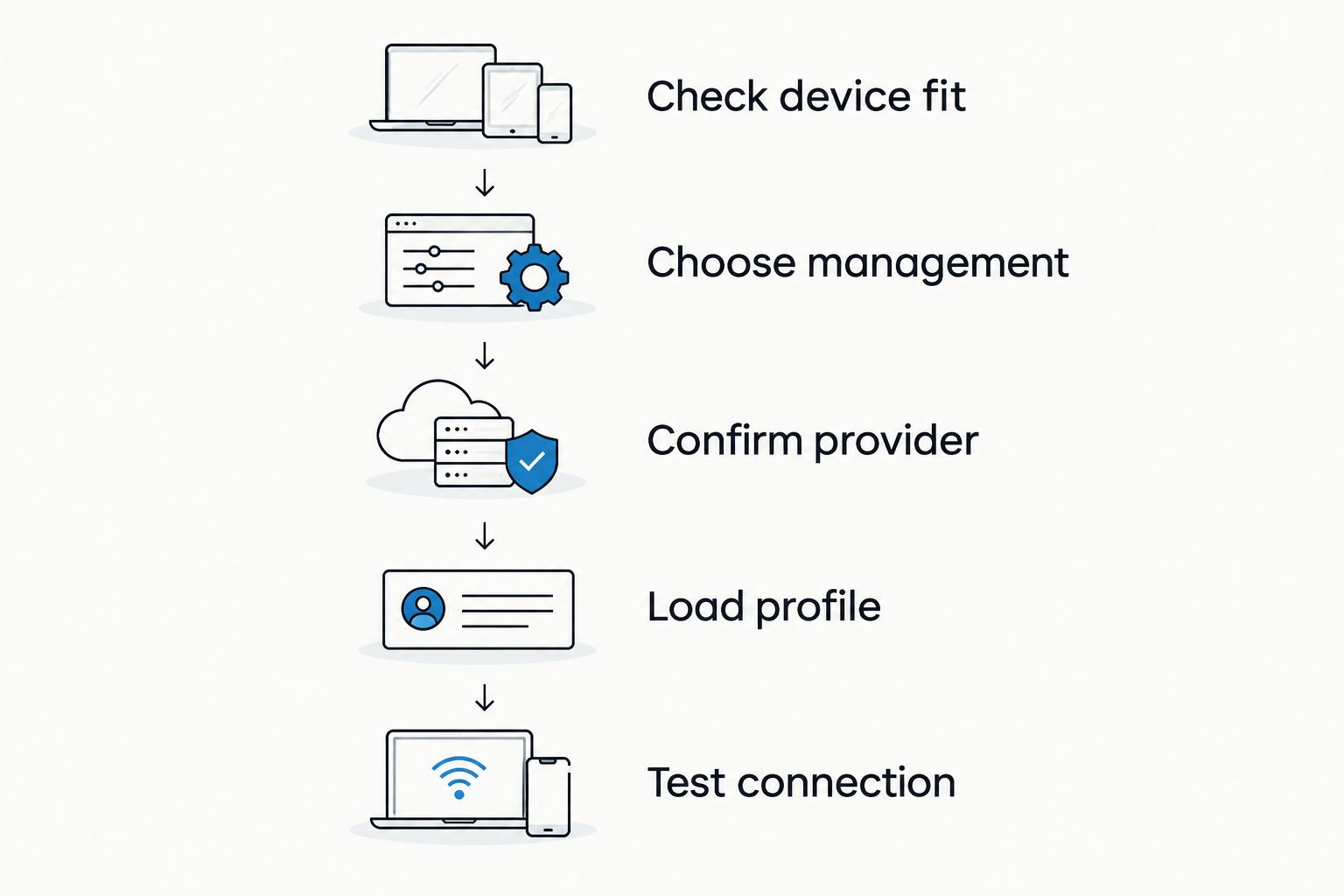
Use this sequence for a 2026 setup. The exact controls depend on your adapter and management route; follow the instructions for that hardware rather than borrowing native-eSIM instructions from another phone.
- Check device fit. Confirm the physical SIM slot, exact model, regional variant, operating system, carrier-lock status and network bands.
- Choose management. Use the supported Switch Android app route or confirm reader-based provisioning. For iPhone use, keep loading and target-device use separate.
- Confirm provider. Check that the provider supports the activation method available through your chosen adapter workflow.
- Load profile. Follow the adapter or reader instructions. A pre-loaded destination-data card already has its initial plan loaded.
- Test connection. Use the configured card in the compatible target device and check the plan's required mobile-data settings.
The order matters: validate the phone and loading route before committing to a plan. A successful profile download is not proof that the target phone can use the intended network.
Pre-loaded destination-data cards: fewer initial setup tasks
Pre-loaded cards address the initial loading step, not the phone's compatibility requirements. You still need the right adapter, a compatible physical SIM slot and a suitable destination plan.
The listed Switch Max destination products include China mainland, Japan and South Korea plans with 10GB of data over 30 days and 20GB of data over 30 days. Those figures describe data allowances and validity, not profile capacity or guaranteed network performance.
| Listed Switch Max plan | Best for | Benefit | Limitation |
|---|---|---|---|
| China mainland, Japan and South Korea: 10GB / 30 days | Buyers whose planned use fits the smaller allowance | Initial destination plan is pre-loaded | Confirm coverage details and activation timing |
| China mainland, Japan and South Korea: 20GB / 30 days | Buyers who need the larger listed allowance | More included data than the 10GB option | More data does not change phone compatibility |
Check the current plan terms before choosing. A reader and a pre-loaded card solve different problems: the reader supplies a loading method, while the card supplies an initial loaded plan.


Why eSIM adapter compatibility varies
A product recommendation only holds when the whole setup fits. Check these factors together:
- Physical SIM hardware: the target device needs a compatible slot for the removable adapter.
- Model and regional variant: verify the exact device, not just its marketing name.
- Operating system: profile management depends on the supported software and device combination.
- Carrier-lock status: an adapter does not remove restrictions on using another carrier.
- Network bands: the phone must support the network used by the plan.
- Provider activation: the eSIM provider must support the available loading method.
Can you use an adapter without an Android phone?
Yes, reader-based provisioning provides a loading route without an Android phone. A pre-loaded destination-data card also removes the initial loading task, but you should still establish how you will manage later profile changes.
Does an adapter give an older phone native eSIM settings?
No. An adapter supplies removable profile hardware through the physical SIM slot; it does not install native eSIM hardware inside the phone. Use the management route specified for the adapter rather than expecting the phone's native eSIM menus to control it.
Can you keep your existing physical SIM as well?
That depends on your phone's available SIM slots and supported configuration. The adapter occupies a physical SIM position, so confirm where your existing card would go and which subscriptions the phone supports together.
Your pre-purchase checklist for 2026
Do not order until you can answer each point:
- What is the target phone's exact model and regional variant?
- Does it have a compatible physical SIM slot?
- Is it restricted to a carrier?
- Will the Switch Android app or Bluetooth reader load profiles?
- Is the management device's operating system supported?
- What profile capacity does the selected adapter specify?
- Does the provider support the required activation method?
- Do the phone's network bands fit the intended service?
- For a pre-loaded card, do destination, allowance and validity fit?
For fleet purchases, confirm the same details across the device list before considering bulk or white-label supply. Those supply options do not remove technical compatibility checks.
FAQ
Can an eSIM adapter work on a phone that has no eSIM support?
Yes, an eSIM adapter can provide access to eSIM profiles through a compatible physical SIM slot. The exact phone, operating system, carrier restrictions and provider requirements still determine whether the setup works.
Which adapter should I choose for an Android phone?
Choose Switch Pro when you have a compatible Android device for management through the Switch Android app. Confirm both the management device and the target phone before buying.
Which adapter should I choose for an iPhone without native eSIM?
Choose Switch Max only after confirming that your exact iPhone variant has a compatible physical SIM slot and supports the configured card. Establish the profile-loading route separately from iPhone use.
Do I need Android to load profiles onto the adapter?
No, the Bluetooth reader provides a provisioning route without an Android phone. Confirm the reader's supported card and setup procedure before buying.
Will an eSIM adapter bypass my phone's carrier lock?
No, an eSIM adapter does not bypass a carrier lock. Resolve the restriction with the carrier before relying on a profile from another provider.
Does storing multiple profiles mean they all work at the same time?
No, stored profile capacity is not a count of simultaneous active connections. Check the adapter's profile specification and the phone's supported SIM configuration separately.
Does the reader's no-account claim mean the mobile plan needs no account?
No, the reader's no-account claim describes its provisioning workflow. Your eSIM provider's account, activation and identity requirements remain separate.
One last thing
Choose the management route before choosing the card. A compatible phone is only half the setup: you also need a supported way to load and manage its profiles. That distinction prevents an Android-management purchase from becoming an unresolved iPhone setup.