

SimplyESIMs alternatives in 2026
Switchesim is the best fit among SimplyESIMs alternatives in 2026 if you need an eSIM adapter for a compatible physical SIM slot. Choose Switch Pro for Android-based profile management, Switch Max for use in a compatible iPhone, or the Bluetooth reader when you need to load profiles without an Android phone.
- Comparing simplyesims alternatives? Choose Switch Pro for Android-based eSIM profile management on compatible hardware.
- Choose Switch Max for a compatible iPhone with a physical SIM tray; confirm the profile-loading method separately.
- The Bluetooth reader loads profiles without an Android phone; it does not replace the adapter card.
- Keep SimplyESIMs if its documented capabilities already meet your device, provider and profile-management requirements.
Why this comparison matters
An eSIM adapter and an eSIM data plan solve different problems. The adapter provides a hardware route for using eSIM profiles through a compatible physical SIM slot; the provider supplies the mobile service.
Before replacing SimplyESIMs, identify which part needs to change. A different adapter will not unlock a carrier-locked phone, add missing network bands or make an unsupported provider accept your device.
Choose the management method before choosing the card. Android profile management, using a configured card in an iPhone and loading profiles through a Bluetooth reader are separate workflows.
SimplyESIMs alternatives at a glance
For a 2026 purchase, compare the complete setup rather than the product name alone. The table separates the available hardware routes without assigning unverified specifications to SimplyESIMs.
| Option | Best for | Defining capability or buying check | Difference to evaluate against SimplyESIMs |
|---|---|---|---|
| SimplyESIMs | Keeping a setup that already meets your requirements | Confirm the exact product, device support and loading method | Your baseline: identify a specific limitation before replacing it |
| Switch Pro | Android-based profile management | Switch Android app management | Compare the supported Android workflow and exact handset compatibility |
| Switch Max | Use in a compatible iPhone with a physical SIM tray | Extends use to compatible iPhones | Compare iPhone use separately from profile provisioning |
| Open-source Bluetooth eSIM card reader | Loading profiles without an Android phone | Reader-based provisioning | Compare the equipment and software needed to load profiles |
| Native eSIM | A phone that already supports your chosen provider directly | Built-in eSIM installation and management | Removes the need for an adapter when the existing phone supports the service |
The Switchesim eSIM adapter range is a hardware choice, not a substitute for checking the mobile plan. Confirm provider acceptance, activation requirements and destination coverage separately.
Check device fit before choosing an alternative
Physical SIM slot
Switch Pro and Switch Max require a compatible physical SIM slot in the target device. A phone without a physical SIM tray cannot accept an adapter card, regardless of its operating system.
Check the exact model and regional variant. A familiar handset name is not sufficient evidence because regional versions can differ.
Carrier lock and network support
An adapter does not remove a carrier lock. Check whether the target device accepts the network you intend to use before buying hardware or installing a profile.
Network-band support is another separate check. Successful profile installation does not establish that the device supports the destination network's radio bands.
Management device and operating system
For Switch Pro, the stated management route is the Switch Android app. For Switch Max, distinguish using a configured card in a compatible iPhone from the process used to load that card.
The Bluetooth reader provides a profile-loading route without an Android phone. Confirm the reader's supported control software and operating systems before making it part of your setup.
1. Switch Pro: best for Android-based profile management
Switch Pro requires compatible hardware and an Android-based management workflow. According to Switchesim, the Switch Android app manages profiles for this product; that is the reason to shortlist it, not a promise of universal Android compatibility.
Choose this route when you want to manage multiple eSIM profiles through Android. Check both the management handset and the intended target device if they are different.
Where Switch Pro shines
- Provides a defined Android app route for profile management.
- Serves buyers who need multiple profiles without relying on native eSIM support.
- Fits an Android-led setup rather than requiring an iPhone-first workflow.
Where Switch Pro falls short
- Requires a compatible physical SIM slot in the target device.
- Android management is a constraint if you do not have a suitable Android phone.
- Hardware compatibility does not establish provider acceptance or network coverage.
Best for: Android users who have confirmed their device and provider fit.
Before replacing SimplyESIMs, compare the actual profile-management steps. Establish how you install, select and remove a profile, rather than treating an Android app listing as proof that every operation works on your handset.
Verdict: Buy Switch Pro when Android management is the workflow you want and compatibility is confirmed.
2. Switch Max: best for compatible iPhone use
Switch Max is not a solution for an iPhone without a physical SIM tray. Switchesim positions Switch Max for use in compatible iPhones, but using a configured card and provisioning that card remain separate questions.
This distinction matters when your iPhone is your only phone. Confirm the complete loading and switching process before choosing the card.
Where Switch Max shines
- Extends the adapter option to compatible iPhones.
- Gives buyers a product specifically positioned for iPhone use.
- Supports a hardware-based route where native eSIM support is not the chosen approach.
Where Switch Max falls short
- Cannot fit an iPhone that has no physical SIM tray.
- Requires model, regional-variant and carrier-lock checks.
- iPhone use alone does not establish how every profile-management operation is performed.
Best for: Buyers with a compatible iPhone who have confirmed both card use and profile loading.
For a 2026 iPhone purchase decision, ask for the setup path for your exact model. Do not interpret Android and iOS wording as a guarantee that both platforms perform identical management functions.
Verdict: Buy Switch Max for confirmed iPhone compatibility; hold if the provisioning workflow is unresolved.
3. Bluetooth reader: best for loading without Android
The Bluetooth reader is a provisioning accessory, not a replacement for the adapter card in your target device. Its stated purpose is to load profiles without an Android phone, and the reader is described as open source.
Choose it to address a loading requirement. Do not treat Bluetooth connectivity as evidence that every phone, desktop operating system or adapter is supported.
Where the Bluetooth reader shines
- Provides a loading route without an Android phone.
- Separates provisioning equipment from the phone that will use the card.
- Offers an open-source reader option.
Where the Bluetooth reader falls short
- Adds another physical device to the setup.
- Still requires a compatible card and a supported control workflow.
- Open-source status alone does not establish security, privacy or operating-system compatibility.
Best for: Buyers whose confirmed provisioning workflow must work without Android.
Check the reader, card and controlling device as a complete combination. A supported reader is only useful if it performs the required operations with your selected adapter.
Verdict: Buy the Bluetooth reader when it resolves a confirmed provisioning requirement.
4. Native eSIM: best for an already-supported phone
Native eSIM is not an adapter alternative for every handset. It is the simpler hardware route when your existing phone and chosen provider already support direct eSIM installation.
Where native eSIM shines
- Avoids adding an adapter card or external reader.
- Uses the phone's built-in eSIM management functions.
Where native eSIM falls short
- Requires native eSIM support in the exact device variant.
- Still depends on provider support and carrier-lock status.
Best for: Buyers whose current phone already supports the required service directly.
Verdict: Skip additional adapter hardware when native eSIM already meets your requirements.
Why switch from SimplyESIMs?
A reason to switch is a documented mismatch between your current setup and your required workflow. These are decision criteria, not claims that SimplyESIMs has a particular defect.
- Android management: Choose Switch Pro if its confirmed Android workflow meets a requirement your current setup does not.
- Compatible iPhone use: Choose Switch Max if your exact iPhone and provisioning method are supported.
- Loading without Android: Add the Bluetooth reader if it supplies the missing loading route.
- Different deployment needs: Discuss bulk or white-label supply when you need hardware for resale or deployment rather than an individual purchase.
Switchesim also offers pre-loaded destination-data cards. Treat these as a separate purchasing route: confirm the included service, intended destination and activation conditions instead of assuming they match a reusable adapter purchase.
Do not switch merely because another product advertises more stored profiles. Storage, active service and switching workflow are different requirements.
Profile capacity and privacy: ask precise questions
For your 2026 shortlist, request the current capacity specification for the exact card. Ask whether the stated capacity depends on profile size, and distinguish stored profiles from profiles that can be active simultaneously.
Write down your actual requirement. A card that stores your intended profiles but cannot switch them through your available management device does not meet that requirement.
For privacy, examine the complete provisioning path. Ask where activation credentials are processed, whether an account is required, what the app or reader logs and whether diagnostic information leaves your device.
Open source describes access to source code; it is not a privacy guarantee. Apply the same questions to SimplyESIMs, the Switch Android app and the Bluetooth reader rather than assuming one label answers them all.
A pre-purchase and setup checklist
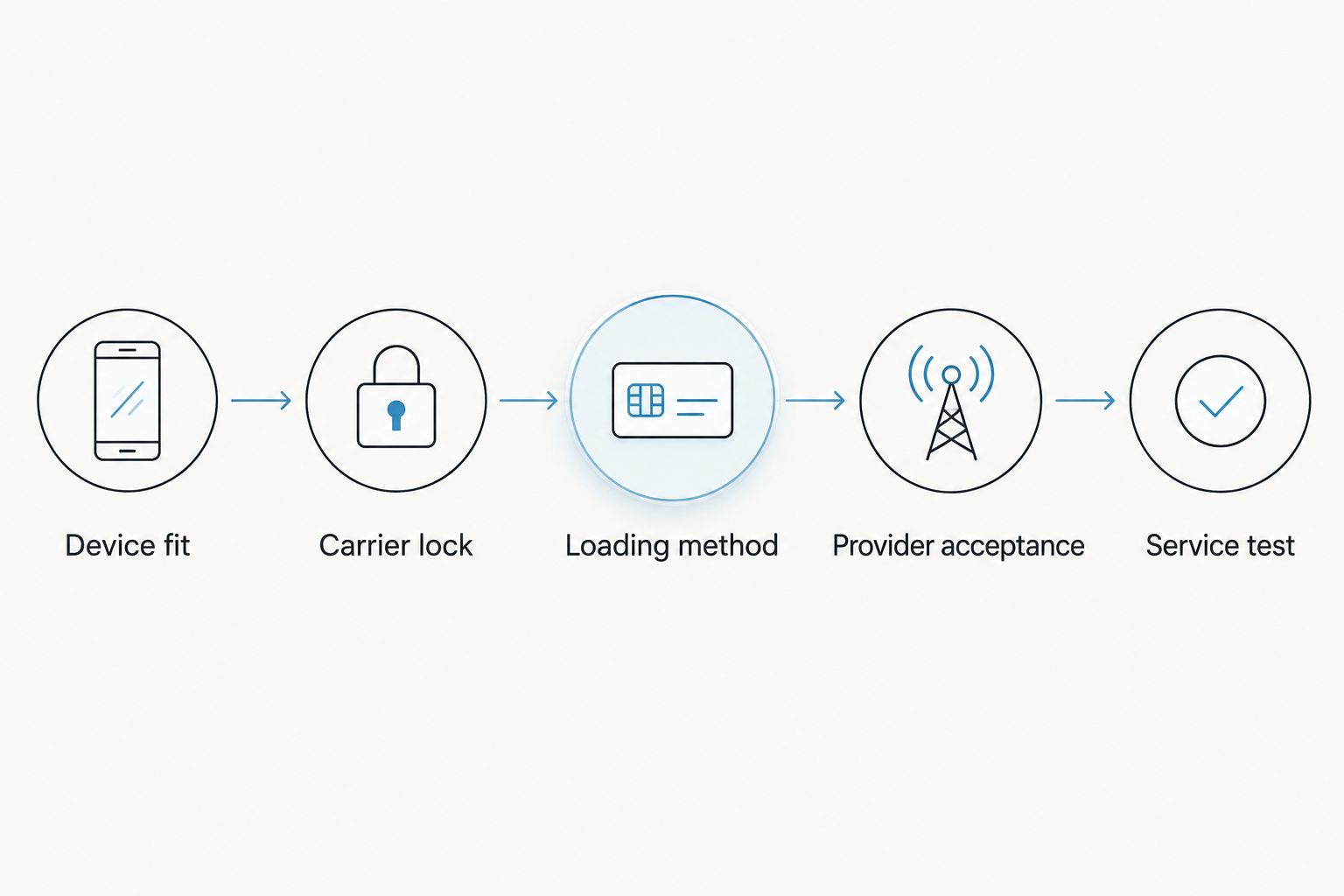
Use this sequence before committing to an alternative in 2026. Resolve compatibility first, then choose the loading method and check service operation.
- Device fit: Record the exact model, regional variant, operating system and presence of a physical SIM slot.
- Carrier lock: Confirm that the device accepts the intended network and supports its required bands.
- Loading method: Choose Android management, a confirmed Max provisioning route or the Bluetooth reader workflow.
- Provider acceptance: Confirm that the provider permits the intended adapter and supplies a supported activation method.
- Service test: Follow the documented installation process, then check the services included in your plan before relying on it.
Keep the existing working service until the replacement has passed your checks. Before removing a profile, confirm the provider's reinstallation or transfer rules; moving a card and reinstalling a profile are different actions.
When staying with SimplyESIMs is the right call
Stay with SimplyESIMs when your current setup supports your devices, loads the profiles you need and lets you manage them through equipment you already have. A replacement needs to solve a specific problem.
For a 2026 comparison, document that problem in a sentence before buying. If the answer is only that another product appears on an alternatives list, keep the working setup.
FAQ
What's the best SimplyESIMs alternative for Android?
Switch Pro is the relevant choice when you want Android-based profile management and have confirmed hardware compatibility. Its stated management route uses the Switch Android app; check your exact handset and provider before buying.
Which SimplyESIMs alternative works with an iPhone?
Switch Max is positioned for use in compatible iPhones with a physical SIM tray. Confirm the exact regional model and the separate profile-loading workflow before choosing it.
Can I load profiles without an Android phone?
The Bluetooth reader provides a profile-loading route without an Android phone. Confirm the supported card, controlling device, operating system and software as a complete setup.
Will an eSIM adapter unlock my carrier-locked phone?
No, an eSIM adapter does not remove a carrier lock. Check the phone's lock status and whether it accepts the intended network before purchasing hardware.
How many eSIM profiles should an adapter store?
The adapter should accommodate the profiles you actually need to keep installed. Confirm the exact card's current capacity and distinguish stored profiles from simultaneously active service.
Is an open-source Bluetooth reader automatically private?
No, open-source status does not establish the privacy of the complete provisioning workflow. Check credential handling, account requirements, logs and any data sent outside your device.
Should I replace SimplyESIMs if it already works?
Keep SimplyESIMs if it already meets your device, provider and management requirements. Replace it only when a confirmed alternative solves a specific limitation.
One last thing
The deciding feature is often the device you need to manage the card, not the device that uses it. Write down both before ordering: the target phone or other hardware, and the equipment used to install and manage profiles.
That distinction separates Switch Pro, Switch Max and the Bluetooth reader more usefully than an unsupported overall ranking.



